

Payroll support
Our Payroll General team provides key support for Employer Online, our secure and convenient super contribution portal for HR and payroll administrators.
Please note only WA public sector employers can access Employer Online.
If you have an issue with processing your payroll file, or an Employer Online question, you can email payroll.general@gesb.com.au for help.
We aim to get back to you within two business days but if the matter is urgent, please call us on 13 43 72.
You might also find the answer in our employer FAQs:
What is a complying fund?
A complying fund is a super fund that meets specific requirements and obligations outlined in the Superannuation Industry (Supervision) Act 1993.
As an employer, it is your responsibility to check whether the fund an employee has nominated is a complying fund.
To check whether a fund is complying, you can look up the fund through our GESB Clearing House complying fund register.
You can also visit Super Fund Lookup to check whether a fund is complying.
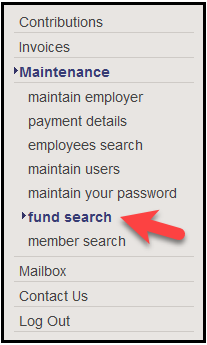
1. Log in to Employer Online and navigate to the 'maintenance' section, and select 'fund search'.
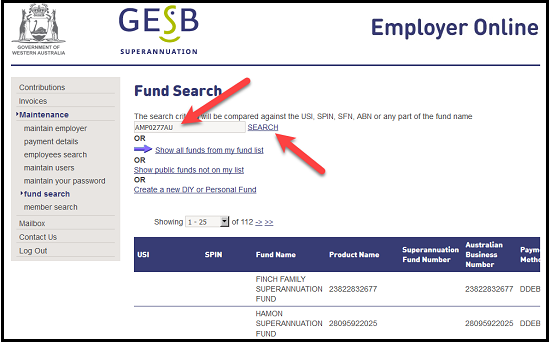
2. On the 'fund search' page you can search for a fund by entering the fund's name, Unique Superannuation Identifier (USI), Superannuation Product Identifier Number (SPIN), Superannuation Fund Number (SFN) or Australian Business Number (ABN) in the search field and clicking 'search'.
What happens if I process a superannuation contribution overpayment in Employer Online?
If you overpay West State Super and/or GESB Super contributions, these can’t be recovered automatically without approval from us and your employee first.
For more information on the refund recovery procedures, watch our recorded webinar, download the superannuation overpayment process flowchart document and complete the employer refund request form and employee authorisation form available from Employer Online.
Once we have received and processed these two forms, the overpayment will be deducted from the overall file total, in the pay period you choose to recoup the funds.
Can any employer pay into GESB?
Yes. GESB can accept employer contributions from all employers into a GESB Super account.
West State Super, Gold State Super and Retirement Income Pension accounts can’t accept external contributions from non-government employers. These restrictions apply to Superannuation Guarantee (SG) and salary sacrifice contributions.
Process for non-government employer contributions
Members who work outside the WA public sector must submit a Fund nomination form to their non-government employer. This form is produced by GESB as an acceptable alternative to the ATO standard choice form and includes the GESB Super USI and fund details. Members can send their employer an online nomination form by email or complete a PDF nomination form.
Payroll officers will need to process the members’ SG contributions to a GESB Super account as per their usual super payment process through their preferred Clearing House. If the member does not have a GESB Super account, we will open one for them once we receive their SG contribution.
Non-government employer contributions submitted to a West State Super or Gold State Super account will be rejected. Members with these accounts can make after-tax contributions online through BPAY® or by cheque or money order using a Super contributions form.
Thank you for printing this page. Remember to come back to gesb.wa.gov.au for the latest information as our content is updated regularly. This information is correct as at 16 June 2026.