
Add money to your super
It's never too early to add to your super to help boost your retirement savings.
We have a range of resources available to help you understand your options and the benefits you may have.



Learn about other contributions
It’s worth learning about other ways you might be able to increase your super. You might be eligible for:
Try our calculators
CalculatorsYou can use our range of calculators to take control of your super and plan for your retirement.
Salary sacrificing in super webinar
Register nowIn this 30-minute webinar, you'll explore how you can ‘sacrifice’ part of your before-tax salary to your super account, instead of having it paid to you as a salary. Learn through case studies how this strategy can be a tax-effective way to boost your balance.
| Date | Time |
|---|---|
Monday, | 3.30pm - 4pm |
FAQs
Find answers to some of the questions you may have about how to add money to your super:
How do I make a contribution to my super through Member Online?
You can make contributions to your super in two different ways; before tax (salary sacrifice) or after tax.
You can make after-tax contributions to your account through your employer, by using BPAY® or by cheque or money order. These are known as personal contributions - and we don’t charge you any fees for contributing to your account in these ways.
In Member Online you can submit a request to your employer to start making contributions to your super from your pay. Please note, some employers can’t accept our form, so you’ll need to get a form directly from your employer. Check with your payroll department for details.
To make contributions, we need to have your tax file number (TFN). You can provide your TFN through Member Online in the ‘Personal details’ section, if you haven’t done this already.
To make a contribution, log in to Member Online and visit the ‘Contribute’ page.

You’ll find a section called ‘Before-tax contributions’ and a section called ‘After-tax contributions’.
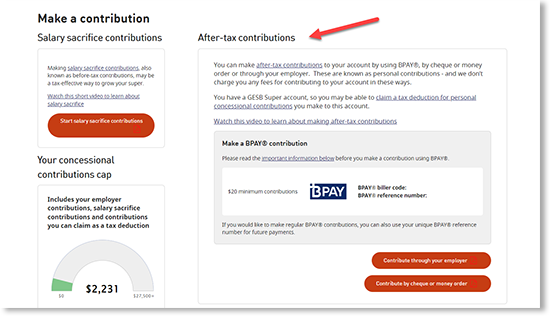
If you’d like to make an after-tax BPAY contribution, you’ll find the biller code and your unique BPAY reference number in this section. You can copy or print these details to make your contribution through your bank or financial institution.
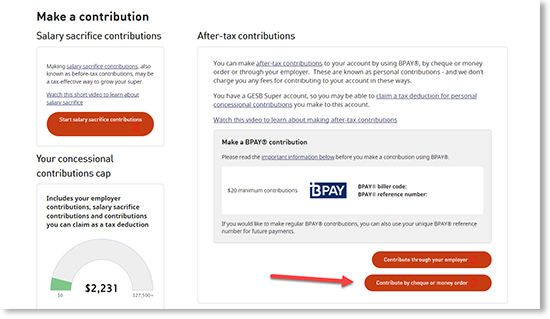
You’ll also find links to contribute through your employer or contribute by money order or cheque.
These links will direct you to a form to complete, depending on which type of contribution method you choose.
You can complete and print the money order or cheque form and post in with your contribution.
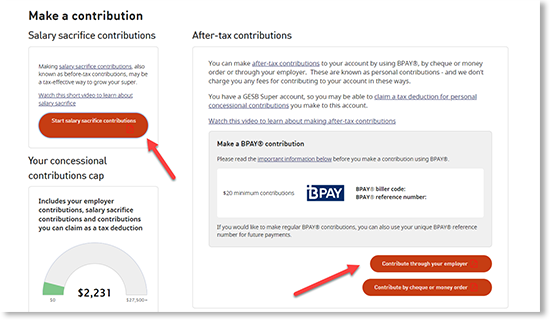
If you choose to make a contribution through your employer, you can choose whether you would like to make a before-tax (salary sacrifice) or after-tax contribution. You can choose whether you’d like to contribute a set amount or percentage of each pay, if you’re eligible.
Once you’ve completed the form, you’ll need to read and agree to a declaration and submit your form.
We will then send your request to your employer and confirm this with you by email.
Whether you make a BPAY, cheque or money order or an employer contribution, your contributions will appear in your transactions on your ‘Accounts’ page once they’ve been processed.
How to make an after-tax personal contribution by cheque or money order
Follow these steps to make your contribution by cheque or money order.
1. Learn about personal contributions
Check that making after-tax personal contributions is the right option for you by reading:
- Contributing to your super to learn about making extra contributions to your super
- After-tax personal contributions for more information
2. Work out how much you’d like to contribute
Before you complete the Super contributions form, you need to know how much you’d like to contribute to your super.
You can choose any amount that suits you, but if you go over your non-concessional contributions cap, you may have to pay more tax.
If you’re not sure how much you’d like to contribute, try our Retirement planning calculator.
3. Print and complete the form
Download, print and complete this Super contributions form for after-tax contributions.
The form has six sections with instructions on the information to provide.
4. Post the form and your cheque or money order to us
Now that you’ve completed and signed your Super contributions form, you need to send it (with your cheque or money order attached) to:
GESB
PO Box J 755
Perth WA 6842
Australia Post can take up to six business days to deliver regular mail. Please take this into account when submitting contributions to us, especially when you need to meet a processing deadline.
How to make contributions through your employer
To arrange either before-tax (salary sacrifice) contributions or after-tax contributions to your super through your employer's payroll department, here's what to do.
Action summary
- Time it takes
Approximately 15 minutes to complete the form - Cost
No set up fee - Result
You’ll help grow your super, which means you could enjoy a more 'comfortable' retirement - What to consider
The dollar amount or percentage you want to contribute
What you’ll need
- Printed form to complete
- To know the type of super account you have - GESB Super or West State Super
- Your payroll number, if you have it
Need help
- Call us on 13 43 72
1. Decide if you want to make a before-tax or after-tax contribution
We recommend you read the information below to help you choose which contribution option is right for you:
- The Contributing to your super brochure is about making extra contributions
- Visit the Salary sacrifice (before-tax) and After-tax personal contributions pages for more information
2. Work out how much you would like to contribute
Before you complete the form, you need to know how much you’d like to contribute to your super through your pay. You can choose any amount that suits you.
If you’re not sure how much to contribute, try our Contributions calculator.
3. Access the form
First, click the link to access our online Payroll deduction form or download our PDF Payroll deduction form. You will need to print out the PDF form as you cannot type directly into it.
You can use our 'Payroll deduction' form to make either salary sacrifice contributions or after-tax contributions.
Simply follow the instructions in our online form to complete and submit your request online, or keep reading for help with completing the PDF form.
Please note, if you have an existing contribution, the amount you enter will replace your existing contribution.
4. Provide your personal details
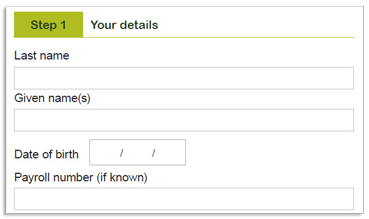
These details include your name, date of birth, and your payroll number if you know it. This will make it easier for your payroll department to process your request.
5. Enter the amount you would like to contribute
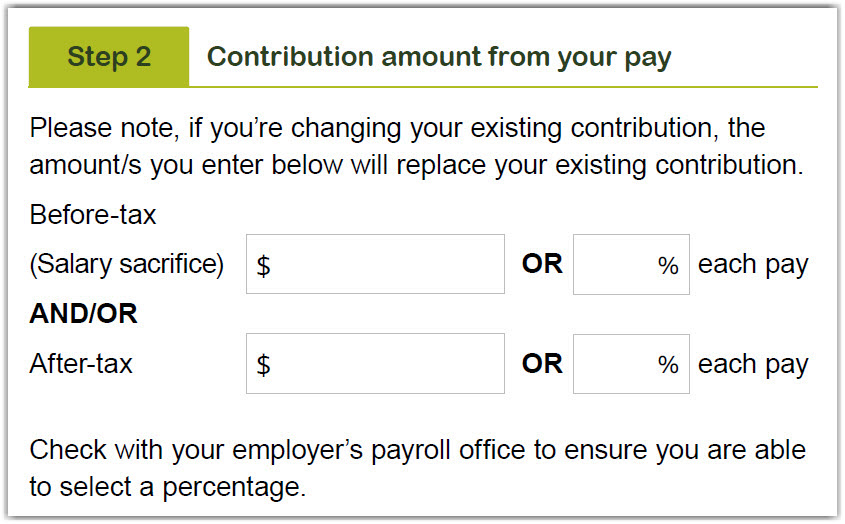
In this section, write the amount you would like to contribute from each pay. You need to enter the dollar amount or percentage of your pay that you would like to contribute in the top boxes for salary sacrifice contributions, or in the bottom boxes for after-tax contributions.
Please note, if you have an existing contribution, the amount you enter will replace your existing contribution.
If you’re still not sure how much to contribute, try our Retirement planning calculator.
6. Confirm your super account
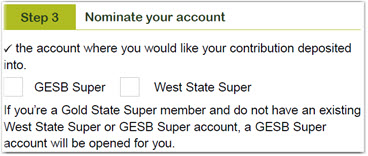
In this step, you need to select GESB Super or West State Super depending on which account you have. If you’re not sure which account you have, check your last member statement, visit the Which super account do you have page or login to Member Online.
If you’re a Gold State Super member and don’t already have a GESB Super or West State Super account, we’ll automatically open a GESB Super account for you.
7. Check that you’re eligible to make contributions
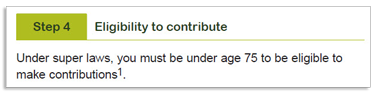
To be eligible to make contributions to your super, you must under the age of 751.
8. Read and sign the declaration
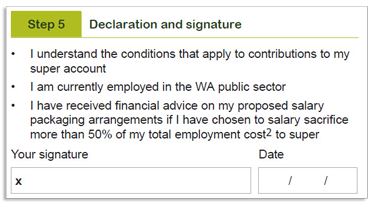
When you sign the form, you’ll need to acknowledge that you understand the conditions that apply to your super account. All of this information is included in the Contributing to your super brochure.
9. Give the form to your employer’s payroll department
Now that you’ve completed and signed the 'Payroll deduction' form, you need to give the form to your payroll department to process.
We can’t process these contributions as they are taken out of your salary before it gets paid to you.
1 We can accept contributions received within 28 days following the end of the month in which you turn 75 years old.
® Registered to BPAY Pty Ltd ABN 69 079 137 518
How does the concessional (before-tax) contribution cap work if I have more than one super fund?
Your concessional contributions cap is the total amount of before-tax contributions you can make in a financial year before you may have to pay extra tax. If you have a GESB Super account and a West State Super account, or a GESB account and an account with another taxed fund, and you make concessional contributions to both, these contributions will be counted towards the cap. However, once you exceed the cap, only additional contributions made to your GESB Super account and other taxed funds over the cap will be taxed at the higher tax rate. Amounts over the cap that are contributed to untaxed funds, such as West State Super, won’t count and therefore won’t be subject to extra tax.
For example, if you make $20,000 in before-tax contributions to your West State Super account and $20,000 to your GESB Super account (including your employer Superannuation Guarantee contributions and any voluntary amounts), $10,000 will be taxed at the higher rate as it will have exceeded the $30,0001 cap for the financial year. However, if you then add another $20,000 to your West State Super account, this won’t be subject to extra tax as it is not counted as exceeding the cap. If you made a further $5,000 in concessional contributions to your GESB Super account - or another taxed fund - that money will be counted as exceeding the cap and be taxed at a higher rate.
For this reason, it’s important you consider before-tax contributions in all your super funds when tracking your contributions, if you have more than one fund or account. You can track contributions to your GESB accounts in Member Online.
1 For the 2024/25 financial year. The concessional contributions cap is indexed annually in line with Average Weekly Ordinary Time Earnings in increments of $2,500 rounded down.
More information
- Combine all of your super into one account
- Read about finding lost super from previous jobs
- Find out how much super you'll need
Need help
- Try our calculators
- Register for one of our seminars or webinars
- Call us on 13 43 72
Thank you for printing this page. Remember to come back to gesb.wa.gov.au for the latest information as our content is updated regularly. This information is correct as at 22 October 2026.